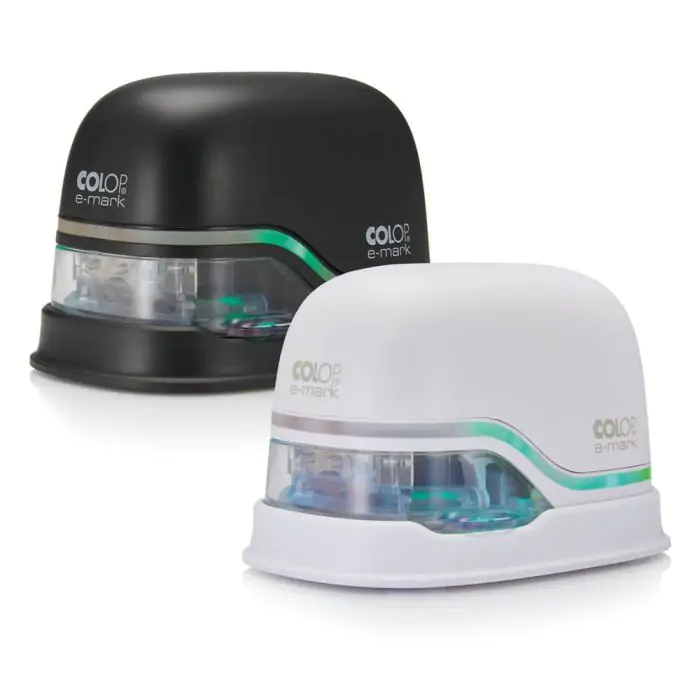
Colop E-Mark Mini Portable Printer – Wi-Fi/USB, Color Ink
Gadget Brand New – 1 Year Warranty SKU IHL-1704
Handheld colour printer: design a logo, text, date, QR code or barcode in the app, then slide the e-mark across paper, cardboard, textiles or wood to print it in one motion.
- Print technology Inkjet, full colour, 600 dpi
- Imprint size Up to 14.5 mm × 150 mm
- Connectivity Wi-Fi, USB
- Colour Black
$149.00
per pcs
In stock
- 1 Year WarrantyCovered from the day you buy
- Reserve onlinePay when you collect — no card needed
- Delivery across LebanonOr collect from our counter
Overview
The COLOP e-mark is a handheld printer that sits in the palm of your hand. Design a logo, a line of text, a date or a barcode in the app, send it to the e-mark over Wi-Fi or USB, then slide the device across the surface: the imprint prints in full colour in one motion, with no press and no ink pad.
What it does
- Connects over Wi-Fi or USB to your phone, tablet or Windows PC
- Prints in full colour from a three-colour (CMY) ink cartridge developed with HP inkjet technology, at 600 dpi
- Prints in one sideways movement, to the left or to the right, at up to 300 mm/s
- Prints directly on absorbent surfaces: paper, cardboard, textiles, cork, untreated wood, stone and unglazed ceramics
- Keeps up to four imprints on the device, so it also works away from the phone
Common uses
- Company stamps and signatures
- Batch, date and time marking, consecutive numbering
- QR codes and barcodes for logistics and office organisation
- Event personalisation, branding on packaging, handmade product labels
Designing an imprint
Imprints are made in the free e-mark app for iOS and Android, or in the Windows software; a Windows printer driver lets any program print to the e-mark. Upload a logo or image (JPG or PNG), add text, pick a template, and the app adds automatic date and time stamps, consecutive numbers, QR codes and barcodes.
How to use the e-mark
- Install the app for iOS or Android, or the Windows software
- Choose an existing imprint or design a new one
- Connect the app to the e-mark over Wi-Fi (or USB on a PC)
- Send the imprint to the e-mark
- Slide the e-mark sideways across the surface, left or right
What is in the box
- COLOP e-mark
- Docking station
- 3-colour (CMY) ink cartridge
- USB cable and power adapter
- Quick setup guide
Cartridge and accessories
One cartridge gives around 1,500 imprints; replacement cartridges, the Ribbon Station for printing on ribbon, the Multiline Printing Tool and the ruler for precise placement are available as accessories.
Specifications
- Print technology
- Inkjet, full colour, 600 dpi
- Imprint size
- Up to 14.5 mm × 150 mm
- Connectivity
- Wi-Fi, USB
- Colour
- Black
- Ink cartridge
- 3-colour CMY (HP inkjet technology), around 1,500 imprints per cartridge
- Printing speed
- Up to 300 mm/s
- Stored imprints
- Up to 4 on the device
- Battery
- Rechargeable Li-ion (11.1 V), about 5 hours of continuous printing
- Weight
- 224.5 g
- Software
- Free e-mark app for iOS and Android; Windows software and printer driver
- Prints on
- Absorbent surfaces: paper, cardboard, textiles, cork, untreated wood, stone, unglazed ceramics
- Accessories
- Ribbon Station, Multiline Printing Tool, ruler, replacement cartridges (sold separately)
Not sure it's the right one?
Tell us what you'll use it with and we'll tell you straight whether it suits — and what else you might need.
Or send a message
Ask about compatibility, stock or a quote for several units. We reply within working hours.
You may also need
All gadgets & smart devices



Kodak Cherish C125 Baby Monitor Camera – Wi-Fi App, Two-Way Talk, Night Vision
IHL-1316 In stock$48.00